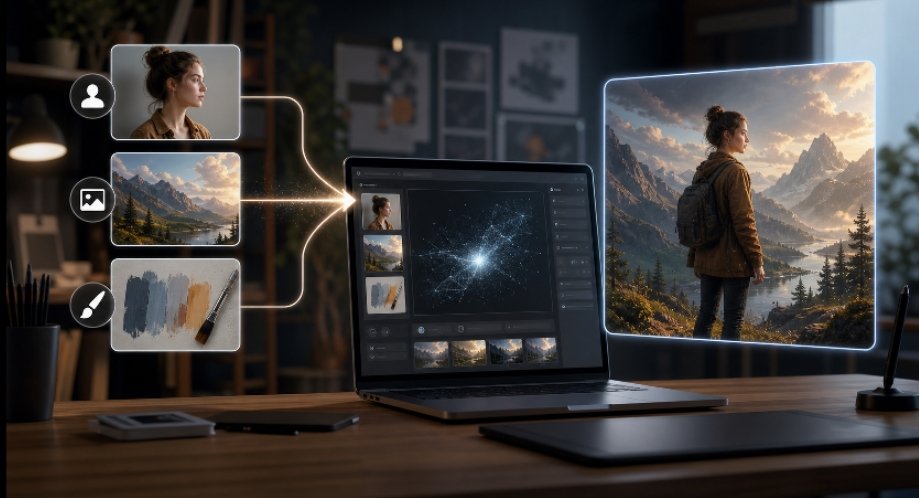
AI image generation has become easier to access, but it has not always become easier to direct. Many creators can describe an idea in plain language, yet still struggle to explain a character’s exact look, a product’s mood, a lighting style, or the difference between “clean editorial” and “generic stock.” That gap is where Whisk AI becomes relevant: it represents a visual-reference workflow for remixing subject, scene, and style inputs without forcing every creative decision into a long text prompt.
This shift matters because image generation is no longer used only by prompt hobbyists. Marketing teams, small studios, ecommerce sellers, educators, and independent creators now need quick visual drafts for campaigns, concept boards, thumbnails, product ideas, and social content. Their problem is rarely a lack of imagination. More often, the friction comes from translating a visual intention into language that an AI model will interpret consistently.
Visual reference workflows change the starting point. Instead of asking users to write a perfect prompt from a blank page, they let users begin with materials they already understand: a product photo, a character sketch, a location image, a color mood, or an existing style direction. The result is not automatic perfection, but a faster bridge between intent and first draft.
The Prompt Problem In Creative Work
Text prompts are powerful, especially when a user knows how to structure them. A good prompt can specify subject, camera angle, lighting, composition, texture, medium, constraints, and output purpose. For professional users, that control is valuable.
The difficulty is that prompt quality depends on the user’s ability to describe visual detail with precision. A designer may instantly recognize the right composition but still need several attempts to describe it. A founder may know the brand mood they want but not the vocabulary for lens length, color grading, scene blocking, or material finish. A social media manager may need ten variations before lunch, not a lesson in image prompt engineering.
This is why AI image workflows increasingly combine text with references. A reference image can carry information that is awkward to express in words: the silhouette of a product, the atmosphere of a room, the rhythm of a color palette, or the proportions of a character. When the system can interpret those visual cues, the user spends less time translating and more time judging.
Why Visual References Work Better For Some Tasks
Visual references are especially useful when the desired output depends on relationships between elements. A prompt can say “a soft plush toy in a cinematic forest scene,” but a reference-based workflow can show the character shape, the forest mood, and the illustration style separately. That separation helps creators control the creative brief without overloading one paragraph.
The most practical advantage is direction. In a normal text-only workflow, the first output may miss the intended subject or overemphasize style. In a visual-reference workflow, the model has clearer signals for what should stay recognizable and what can change. The user still needs to review the result, but the starting draft is often closer to the intended lane.
There is also a collaboration benefit. Teams can discuss images more easily than abstract prompt language. A creative director can say, “Keep this subject, move it into this type of environment, and borrow this finish.” That is a more natural conversation than debating whether the prompt should say “minimalist,” “premium,” “gallery-lit,” or “high-end editorial.”
Who Benefits Most From This Approach
Visual-reference AI image creation is most useful for people who need quick visual exploration but do not want to begin every project with a blank prompt. It fits early-stage campaign planning, social media ideation, merchandise concepts, character variations, presentation visuals, and client mood boards.
It is less suitable when the final asset requires exact technical accuracy, legally sensitive representation, or full brand-system control. In those cases, a reference-led AI draft can still help define direction, but final production should involve a designer, editor, or subject-matter reviewer.
The larger trend is clear: AI image creation is moving from prompt writing toward guided creative systems. Text still matters, but visual references make the process more accessible to people who think in images first. For many teams, that is the difference between having an idea and being able to show it.